
KWDB Storage Module Architecture Introduction
1. KWDB Storage System
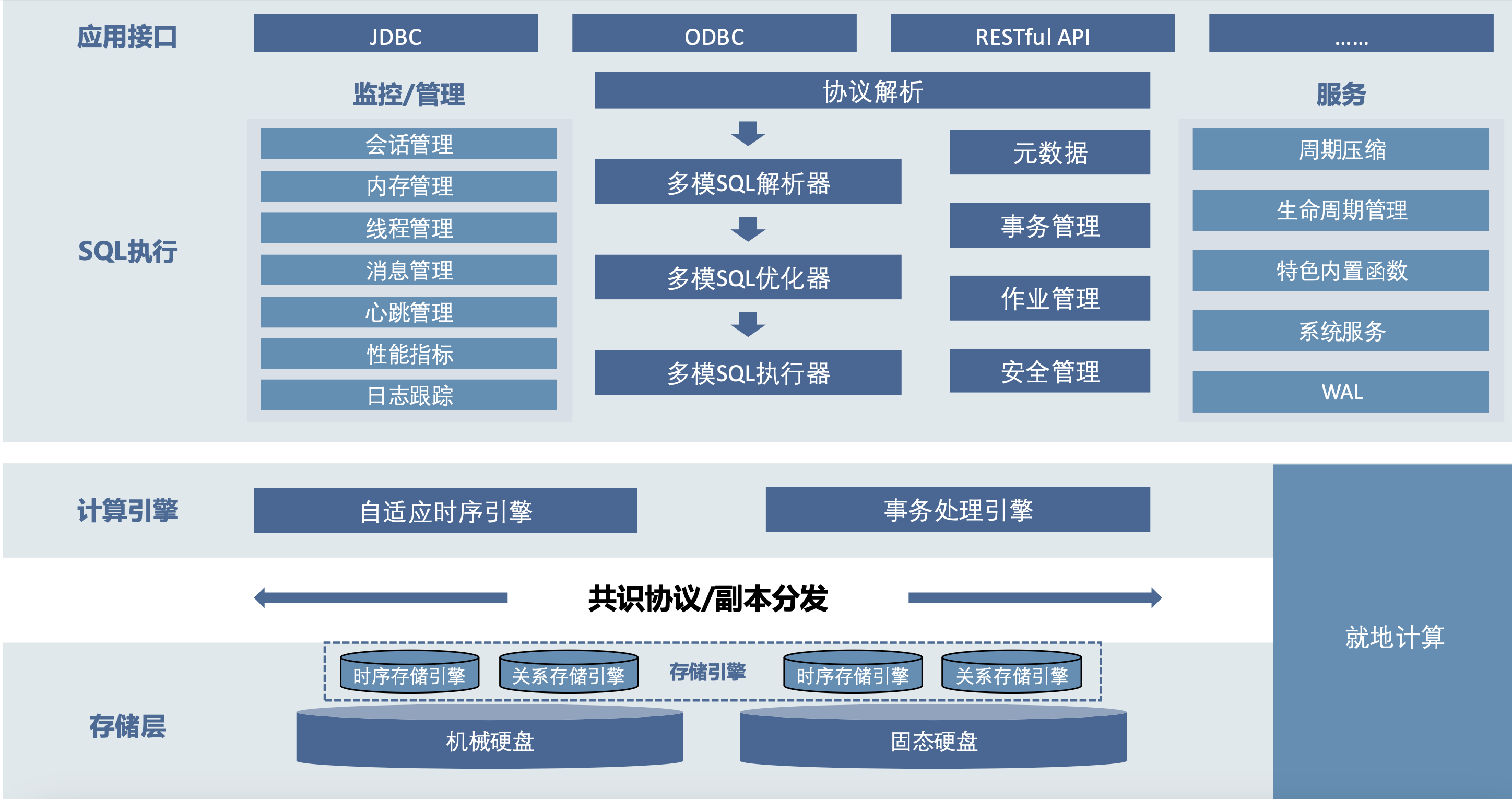
KWDB is the community edition of KaiwuDB, a distributed multi-model database product designed for AIoT scenarios. It supports establishing both time-series and relational databases in the same instance and performing fused processing of multi-model data, featuring efficient time-series data processing capabilities such as ten million-level device access, million-level data writes per second, and billion-level data reads per second. It offers stability, security, high availability, and easy operation, meeting the data management needs of AIoT scenarios and the independent controllable requirements of core systems in key industries. KWDB's multi-model capability is one of its core advantages, mainly reflected in the following aspects:
-
Multi-model Fusion: KWDB supports establishing both time-series and relational databases in the same instance, enabling fused processing of multi-model data. This design allows users to handle different types of data in a single database system, simplifying data management complexity.
-
Unified Data Interface: Through built-in common data models, KWDB provides unified data interfaces supporting fused processing of different data models. This means users can use unified query languages and interfaces to operate on time-series and relational data, improving development efficiency and data operation flexibility.
-
Time-series Data Processing Optimization: For IoT scenarios, KWDB introduced the "Time-series Table" feature, specifically optimized for read/write performance of massive time-series data. This enables the database to handle million-level data writes per second and billion-level data queries per second, meeting the needs of high-speed data ingestion and extreme query speed.
KWDB's consistent and reliable data persistence relies on support from the underlying storage engine. Since relational databases and time-series databases serve different data usage scenarios, different storage engines are needed to optimize performance specifically. The time-series database primarily handles data recorded in time order, usually written in a continuous manner with high time correlation. The time-series storage engine is designed to quickly process large amounts of sequentially written data. In contrast, relational databases need to handle complex data structures and diverse query requests, including multi-table joins and random read/write operations. This requires the relational storage engine to support efficient data retrieval, update, and transaction processing while maintaining data integrity and consistency.
2. KWDB Time-series Storage Engine Architecture
KWDB uses a self-developed time-series storage engine, deeply optimized for time-series data generated by industrial IoT devices. In time-series data application scenarios, a significant characteristic is that data write frequency far exceeds read frequency, which is fundamentally different from traditional relational data management. For time-series data scenarios, KWDB adopts a columnar storage architecture where each column of data is independently stored in its own file. This columnar storage method has several advantages: 1. Reduces I/O, 2. Improves CPU cache performance, 3. Improves compression efficiency, 4. Supports vector processing. These advantages of columnar storage are very suitable for time-series scenarios.
KWDB time-series engine uses memory mapping (mmap) technology to read/write these persistent columnar data files. mmap maps file content directly into the process address space, reducing data copying between user space and kernel space, achieving efficient file I/O operations. mmap utilizes the operating system's page cache mechanism to optimize file access, improving data access speed and consistency while reducing memory usage. mmap is particularly useful when processing large files and scenarios requiring efficient file sharing. This is exactly the scenario faced by time-series databases.
2.1 Storage Structure
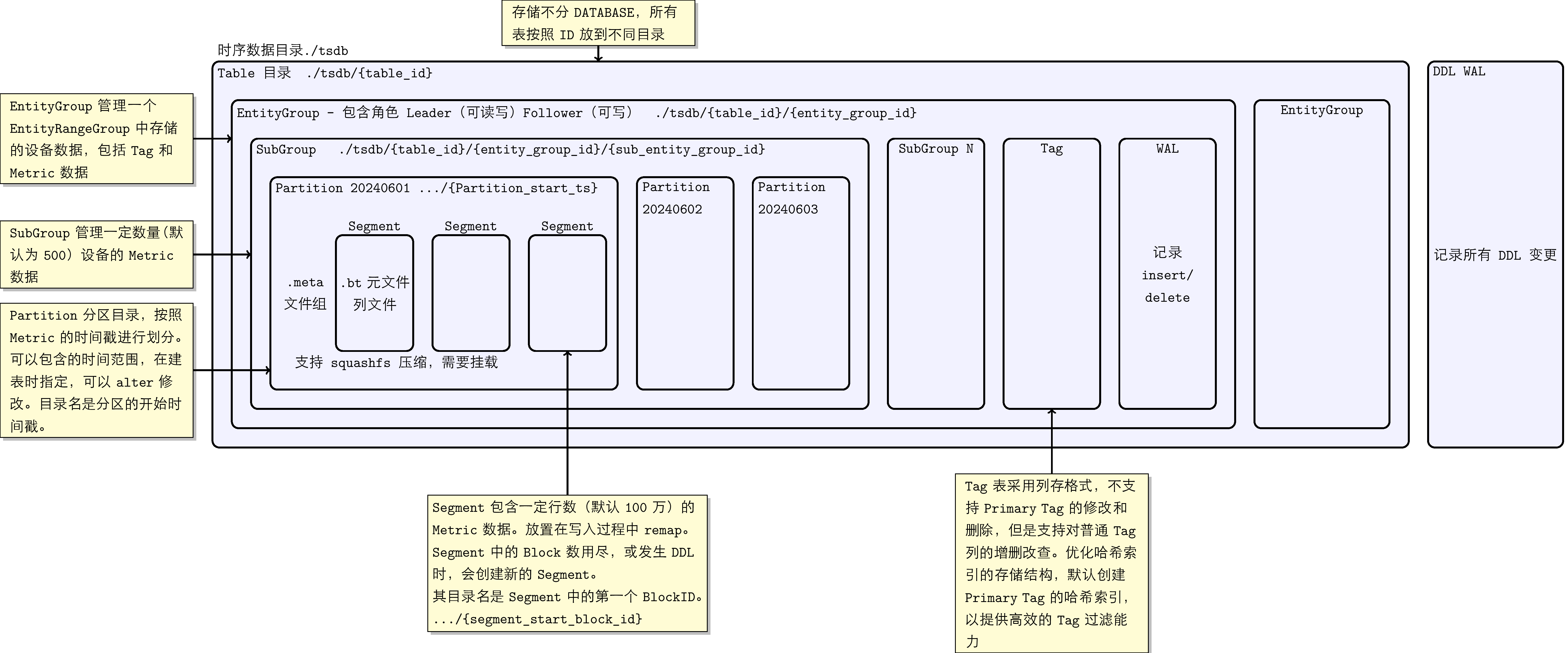
KWDB's underlying time-series storage uses time-based partitioning for data grouping management, facilitating fast time-filtered queries; it uses columnar storage structure to ensure excellent compression effect and query performance. The time-series storage engine stores all data in the ./tsdb directory. In the storage module, all time-series tables are not distinguished by database but are placed in different subdirectories by Table ID. Within each table, time-series data and tags are organized top-down by concepts such as EntityGroup, SubEntityGroup, Partition, Segment, and Block. These concepts have the following correspondences:
-
EntityGroup: The EntityGroup at the storage layer is a relatively independent physical unit. An EntityGroup contains complete Tag table data and Metrics data. At the storage directory level, an independent directory is used to store all data of one EntityGroup.
-
SubEntityGroup: SubEntityGroup is a concept introduced to balance metadata space usage and device (Entity) query performance issues: Metadata MetaBlock is pre-allocated, if the reserved quantity is too large but actual usage is small, it causes space waste, and large numbers of Entity lookups also consume query performance. Therefore, we can set the maximum number of Entities that each SubEntityGroup can store through system parameters. SubEntityGroup is not a completely independent storage unit; multiple SubEntityGroups within an EntityGroup share one Tag table.
-
Partition: Data partition directory, divided according to the timestamp of the Metric. Supports time-based partition management at the time-series table level; different time-series tables can have different time partition parameters. The time partition interval of time-series tables supports dynamic modification: the time partition of old data remains unchanged (including data written to old time partitions with new timestamps), and data with new timestamps calculates partition time according to the new time partition interval.
-
Segment: Each SubEntityGroup may contain multiple Segments. To avoid remap, it is necessary to initialize each column's data with a certain number of rows at the beginning. This fixed number of rows (default 1 million) of column files is placed in a folder, called a Segment.
-
Data Block: In column files, data blocks of the same device are managed by fixed number of rows. Besides containing the values of columns for the fixed number of rows, the Block also contains aggregation results of these values, such as maximum, minimum, total non-NULL values, NULL BitMap, etc.
The main files persisted on storage media are data files, WAL files, and meta files for recording storage structure. These files are introduced respectively:
-
Data files:
- Tag/Primary Tag: Tags are fixed attributes of a group of devices in time-series scenarios. Tags can be divided into regular tags and primary tags; primary tag is a column in the tag columns that can uniquely identify a group of devices. Uses columnar storage format.
- Data files: Data files all use columnar storage. According to whether the data type is fixed-length, they are divided into two categories:
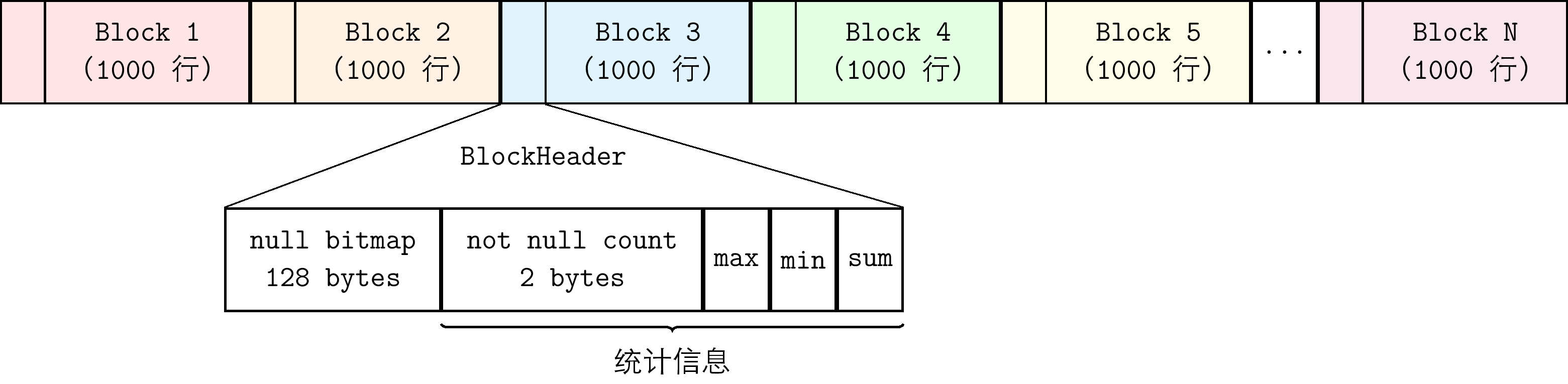
- Fixed-length data types: Each column is stored separately as a column file, located in the corresponding Segment directory. Files use fixed-length Blocks as the basic unit for organization. The file structure is shown in the following figure:
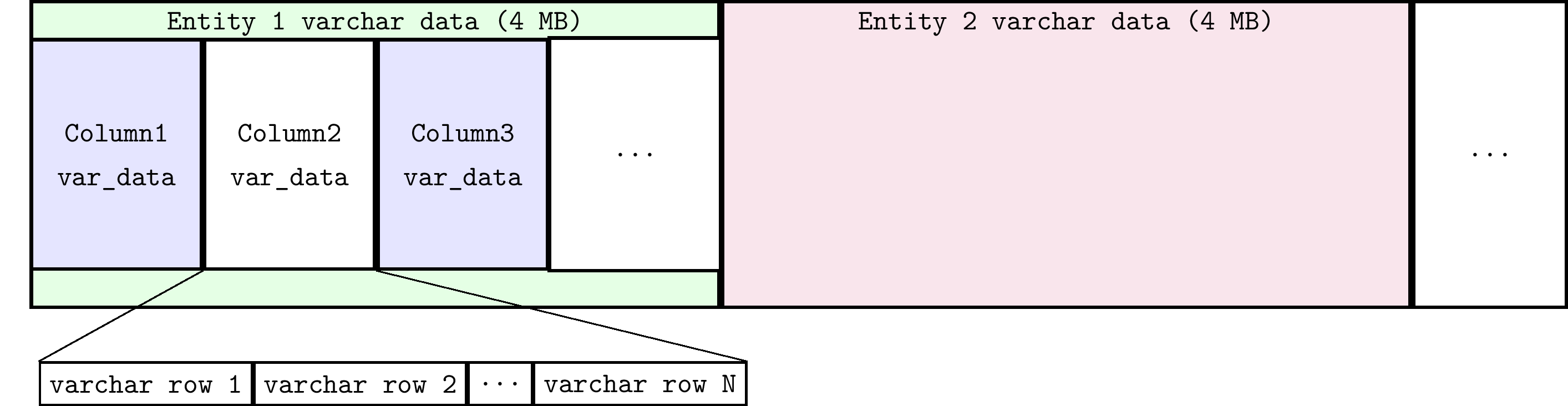
- Non-fixed-length data types (VARCHAR type): All columns share one file with the suffix .s. Even if there are multiple VARCHAR fields in a row, they are stored consecutively in the .s file. The .s file dynamically expands through remap mechanism and is divided into 4M blocks for different Entities. The .s file structure is shown in the following figure:
- Fixed-length data types: Each column is stored separately as a column file, located in the corresponding Segment directory. Files use fixed-length Blocks as the basic unit for organization. The file structure is shown in the following figure:
-
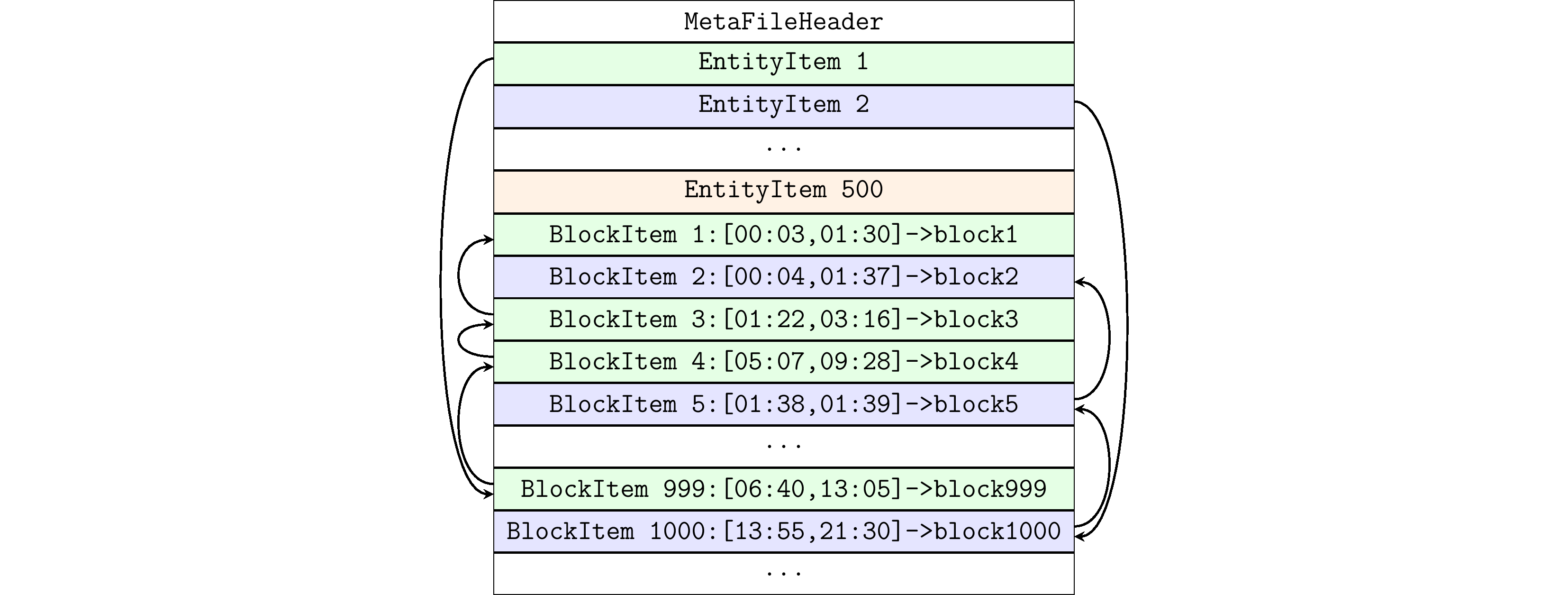
Meta files (.meta files): Records the meta-information of Data Blocks of managed Entities, containing multiple sets of EntityItem and BlockItem. BlockItem IDs are incrementally locked in order, one-to-one corresponding to Block IDs.
- EntityItem: Fixed-length storage, used to quickly locate the starting BlockItem of each Entity. The .meta file manages all BlockItems under an Entity in the form of a linked list. The newest BlockItem is at the head of the linked list, and EntityItem records this BlockItem's ID.
- BlockItem: Fixed-length storage, used to record the position of time-series data within a time range in the columnar data file. BlockItem records the ID of the previous BlockItem node in the linked list, the number of written rows, the delete flag of deleted rows, etc.
The .meta file organizes EntityItem and BlockItem data structures as follows:
-
WAL files: Pre-write log files used to ensure data consistency. In KWDB, WAL is divided into two types. One is the WAL under the
./tsdb/waldirectory, used to store DDL-level WAL. For example, changes to table structure, such as adding or deleting columns and tags of a table. The other is the WAL file under the EntityGroup directory, used to store DML-level WAL. For example, operations such as inserting and deleting data for a certain row.
KWDB time-series storage characteristics:
- Time-series storage splits by Primary Tag of the device into different SubEntityGroups.
- As time-series data is written, it is written to different Partition directories according to the data write time.
- Supports historical partition write and import.
- Usually when reading/writing files using mmap, due to file expansion requiring remap, read/write needs to be locked. To reduce read/write lock conflicts and improve performance, the partition manages reserved space through Segment, default storing 1 million rows (configurable) of data. Read/write of data in Segment is lock-free.
- Compression is performed in units of Segment as sqfs. When reading sqfs files, first use the mount command to mount, and unmount after reading is complete using the umount command. Currently supports Lazy mount and LRU umount. The entire Engine defaults to 1000 Segment mount points; segments exceeding 1000 and unused will be unmounted.
2.2 Data Read/Write Process
The time-series engine's data read/write uses mmap memory mapping technology to directly map persistent data files into memory. At this time, operations on mapped memory are equivalent to operations on files. Compared with traditional I/O system calls read and write, mmap can effectively avoid data copying during read/write and context switching between user space and kernel space. Therefore, implementing file read/write through mmap is more efficient than using I/O system calls.
At the initial design of KWDB time-series storage engine, by analyzing characteristics of IoT time-series scenarios where most data is sequentially written with few deletions, etc., to achieve extreme data write performance, schemes of unsorted writes, sorted reads, and marker deletions were adopted. At the same time, to support out-of-order read/write, a storage small-range sorted read function was implemented to reduce performance loss from out-of-order data reading. Regular data sorting and reorganization are also supported to ensure ordered storage of historical data, and to clean up deleted rows or column data.
2.2.1 Data Write
Storage uses columnar storage, using .meta files as indexes to manage Data Blocks. The BlockItem recorded by EntityItem at the linked list head is the current unfilled BlockItem. Through this BlockItem, the offset of the Data Block in the file can be located, and written data will be appended to this Data Block. The basic flow of time-series data write is as follows:
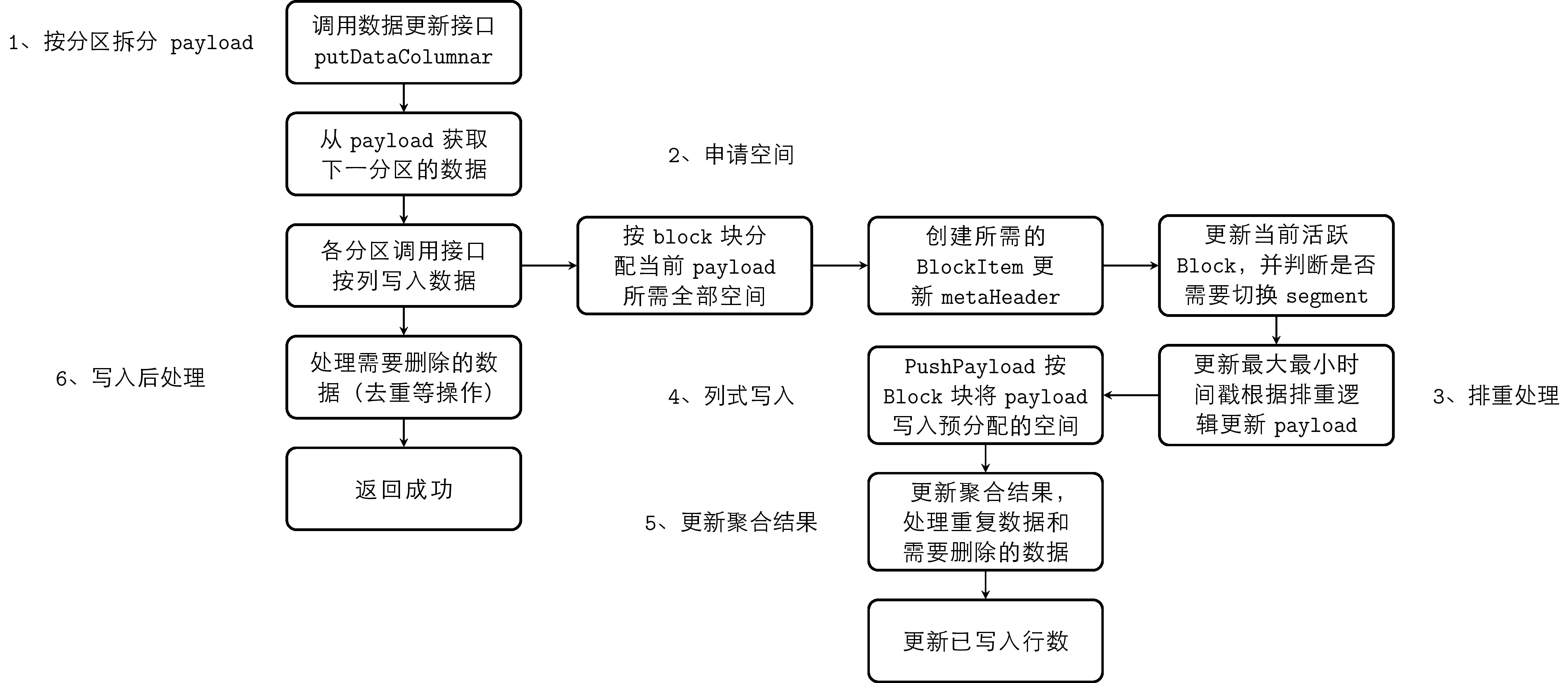
- Split the payload provided by the execution layer according to time partition
- Each partition allocates all required space for the split payload by Block
- Perform deduplication processing according to deduplication rules
- Columnar write, write payload to pre-allocated space by Block
- Update aggregation results saved in Block
- Post-write processing, process data that needs to be deleted
Storage supports deduplication of multiple data writes with the same timestamp. Deduplication rules can be set at the cluster level through CLUSTER SETTING. The deduplication logic implements marking and deletion of previously written duplicate timestamp data. Since deduplication logic involves queries, it has been optimized for most sequential scenarios. The data time partition records the minimum and maximum timestamps of stored data, judging whether it is sequential write based on timestamp; sequential write data will not enter the deduplication logic.
Currently implemented deduplication rules:
- Override (default config): For the same timestamp data of the same Entity, the entire row will be overwritten. Keep the new, delete the old.
- Merge: For the same timestamp data of the same Entity, partial column merge deduplication will be performed. Keep non-NULL and the latest values.
- Discard: Ignore the newly inserted record, keep the original record.
2.2.2 Data Query
The data query process creates an iterator and obtains data through the iterator's Next interface. The iterator creation process is as follows:
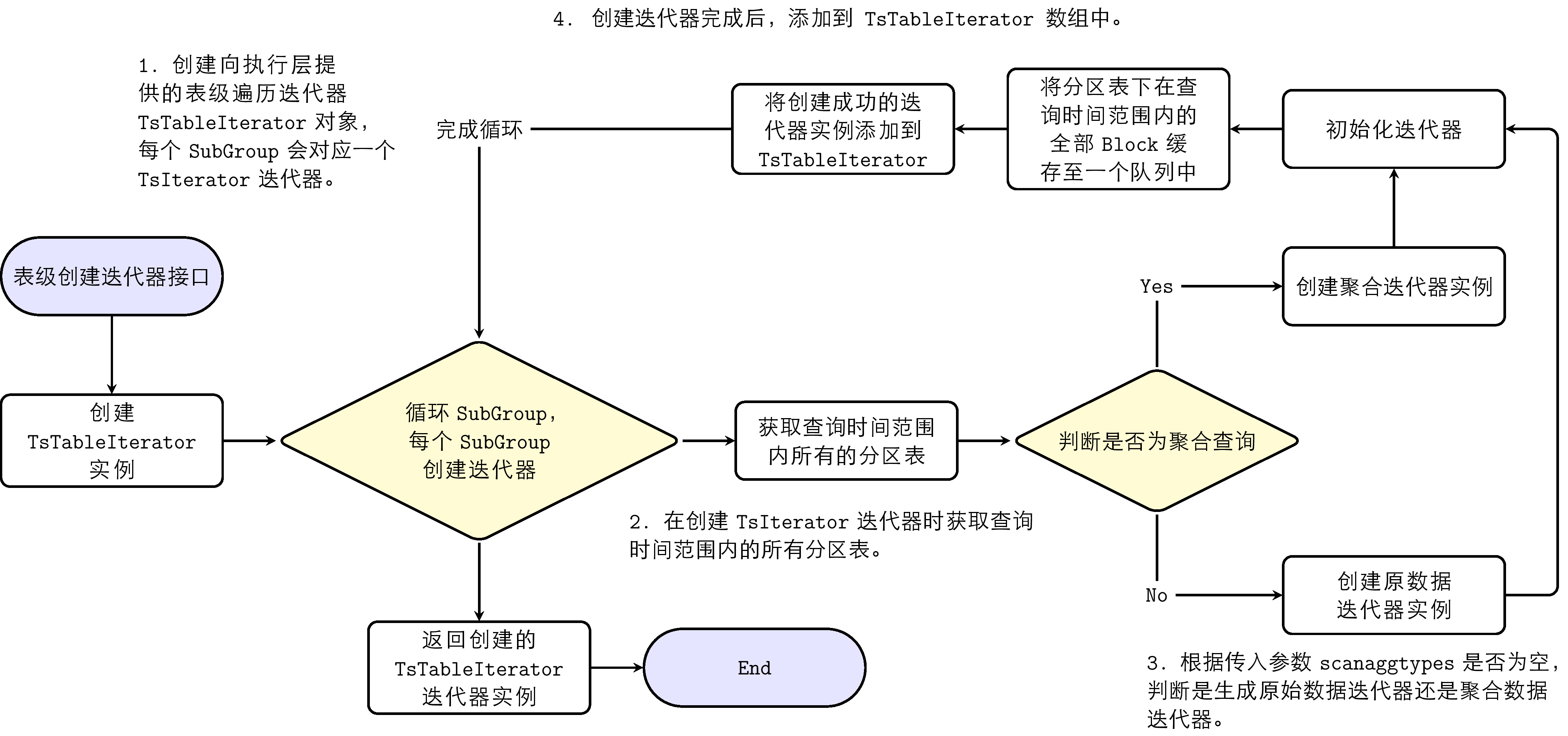
- Create a table-level traversal iterator TsTableIterator object provided to the execution layer; each subgroup corresponds to a TsIterator iterator.
- When creating the TsIterator iterator, obtain all partition tables within the query time range.
- Determine whether to generate raw data iterator or aggregation iterator by judging whether the query is an aggregation query.
- After creating TsIterator, add it to the TsTableIterator array.
The iterator obtained through GetIterator can traverse data through the Next method. The iterator Next process is:
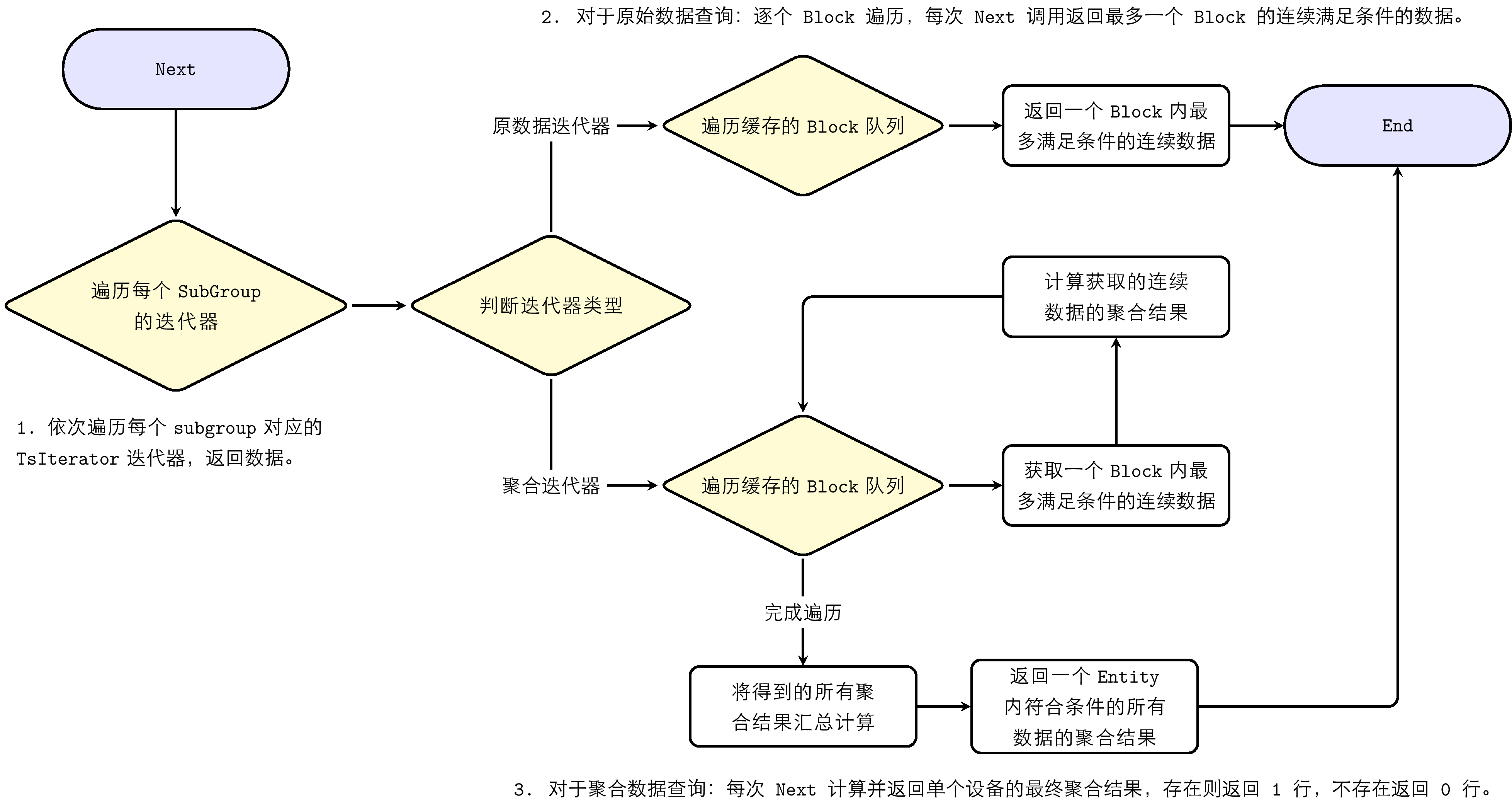
- Traverse each TsIterator iterator corresponding to each subgroup in sequence, return data.
- For raw data query: traverse Block by Block; each Next call returns up to one Block of continuously qualified data.
- For aggregation data query: each Next calculates and returns the final aggregation result for a single device; if it exists, return 1 row; if not, return 0 rows.
- Return values of aggregation results: for integer results, return as Int64; if overflow, return as Double; floating-point results are uniformly returned as Double.
3. KWDB Relational Storage Engine Architecture
KWDB's underlying relational database storage engine is based on RocksDB's Key/Value mode. RocksDB is a persistent, embedded key-value storage engine, designed for storing large numbers of keys and their corresponding values. Keys and values are byte arrays of arbitrary length, so they are untyped. Essentially, the relational storage engine maintains a key-value collection, performing CRUD operations on this collection. The storage engine provides several underlying interface functions for modifying the key-value collection:
put(key, value): Insert new key-value pair or update existing key-value pairdelete(key, value): Delete key-value pair from the collectionget(key, value): Find the associated value through key
In actual production environments, large key-value collections are frequently encountered, often exceeding memory capacity, causing most key-value pairs to be persisted on disk. To efficiently manage this data, the storage engine must adopt an efficient data structure to minimize disk access during key-value updates. LSM-Tree (Log-Structured Merge-Tree) is exactly such an optimized data structure; it organizes key-value pairs intelligently to reduce disk I/O operations.
3.1 Storage Structure: LSM Tree
LSM Tree is also known as Log-Structured Merge-Tree; it is a tree data structure where data at each level is sorted by key. The highest level of LSM-Tree is kept in memory, containing recently written data. Other lower levels of data are stored on disk, with levels numbered from 0 to N. Level 0 (L0) stores data moved from memory to disk, while level 1 and below store older data. Usually the next level of a certain level is an order of magnitude larger in data volume. When the data volume of a level becomes too large, it merges to the next level. In RocksDB, the in-memory tree nodes at the top are named MemTable, and the persistent tree nodes on disk exist as files, named SSTable. These are introduced respectively.
-
MemTable: MemTable is a memory buffer that caches key-value pairs before they are written to disk. All insert, delete, and update operations first update the MemTable. MemTable has a configurable byte size limit. When a MemTable reaches its configured byte size limit, that MemTable becomes immutable, and a new MemTable is created to cache subsequent key-value updates. The default MemTable size is 64 MB. Immutable MemTables will be flushed to disk by background threads as persistent SST files. For query efficiency, MemTable requires an ordered data structure implementation. In RocksDB, MemTable is implemented by SkipList data structure by default.
-
SST File: SST is the abbreviation for Static Sorted Table. SST files contain key-value pairs flushed from immutable MemTable. Since MemTable always keeps key-value pairs in order, the flushed SSTFile is also kept in order. SSTFile is a block-based file format that divides data into blocks of fixed size (default 4KB) for storage. RocksDB supports various compression algorithms for compressing SST files, such as Zlib, BZ2, Snappy, LZ4, or ZSTD algorithms. Similar to WAL records, each data block contains checksums for detecting data corruption. Each time data is read from disk, RocksDB uses these checksums for verification.
SST files mainly consist of data blocks and meta blocks. Meta blocks record non-key-value data information such as bloom filters, indexes, and compression dictionaries. Although key-value pairs in SST are sorted, binary search is not always possible, especially after data blocks are compressed, directly accessing data blocks makes lookup very inefficient. RocksDB uses indexes to optimize queries, stored in the index block immediately following the data blocks. Index maps the last key in each data block to its corresponding offset on disk. Similarly, keys in the index are also sorted, so we can quickly find the block corresponding to a certain key through binary search on the index.
3.2 Data Read/Write Process
3.2.1 Data Write
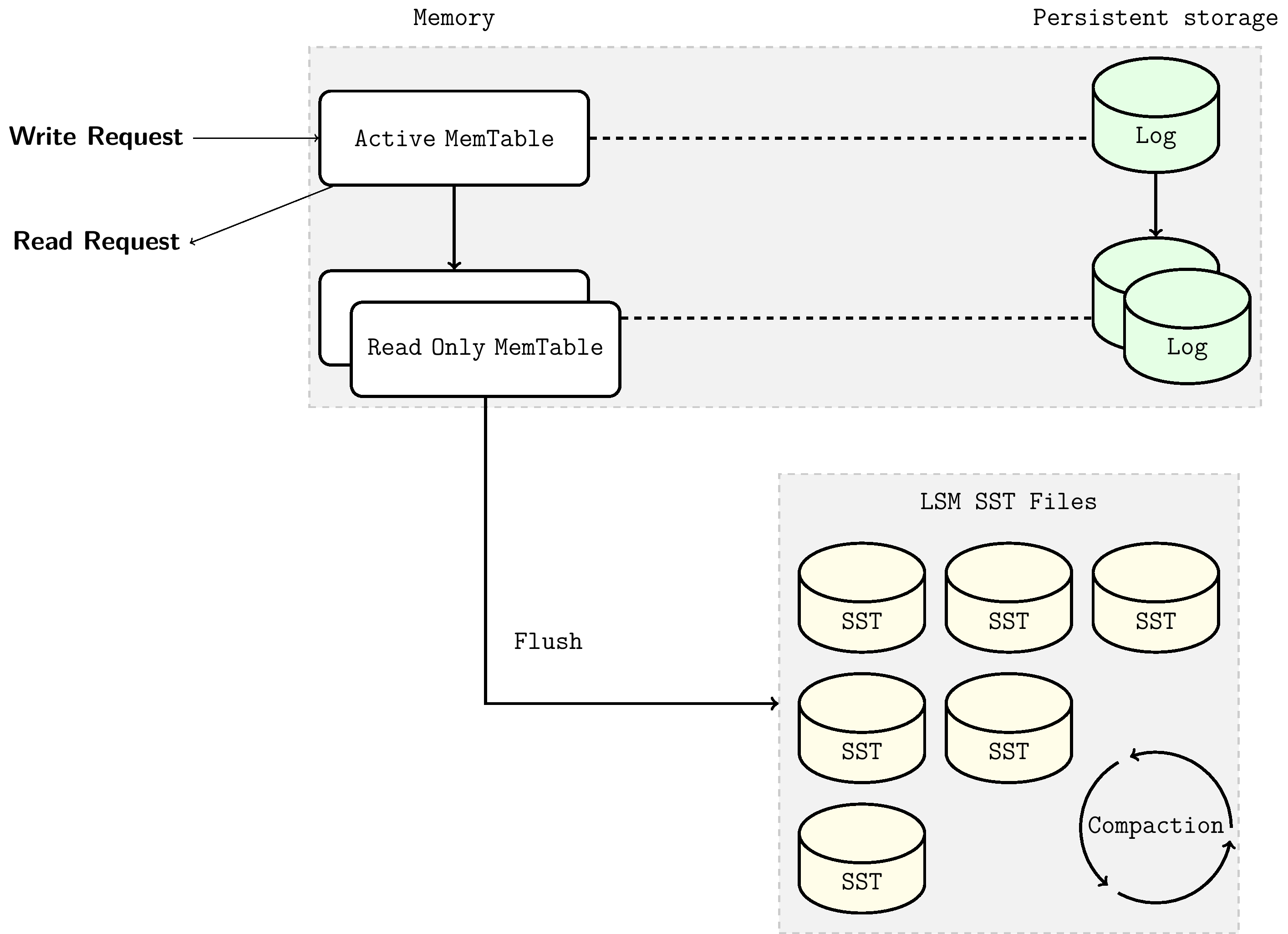
When writing data, it is first written to the MemTable in memory. The data structure maintained by MemTable ensures that after insertion, the entire MemTable remains ordered. At the same time, write operations to MemTable are synchronously updated to the log file (WAL, introduced below). When MemTable is full, it becomes immutable MemTable, and background threads flush the immutable MemTable to become L0 level SSTable files on disk. As data continues to be written, MemTable is continuously flushed to disk, and the number of SST files on L0 level also grows. When the number of SST files on L0 level reaches a preset value, the Compaction mechanism is triggered to ensure that the number of SST files or total file size at each level does not exceed the preset value. For the introduction of the Compaction mechanism, see section 3.2.1.2.
3.2.1.1 Write-ahead Log (WAL) Mechanism
The MemTable-SSTFile-based LSM Tree can efficiently handle key-value read/write during stable database operation. However, a qualified storage engine should have disaster recovery capabilities, ensuring no data loss during unexpected process crashes or planned restarts. Since MemTable is stored in memory and is volatile, this requires that updates to MemTable are simultaneously written to the write-ahead log (WAL) on disk. This way, after restart, the database can recover the original state of MemTable before restart by replaying the WAL. When the WAL's corresponding MemTable is flushed to SSTFile, this WAL will be deleted.
WAL is an append-only file containing a sequence of change records. Each record contains the key-value pair, record type (Put / Merge / Delete), and checksum. Unlike MemTable, in WAL, data records are not sorted by key but are appended to WAL in the order requests arrive.
3.2.1.2 Compaction Mechanism
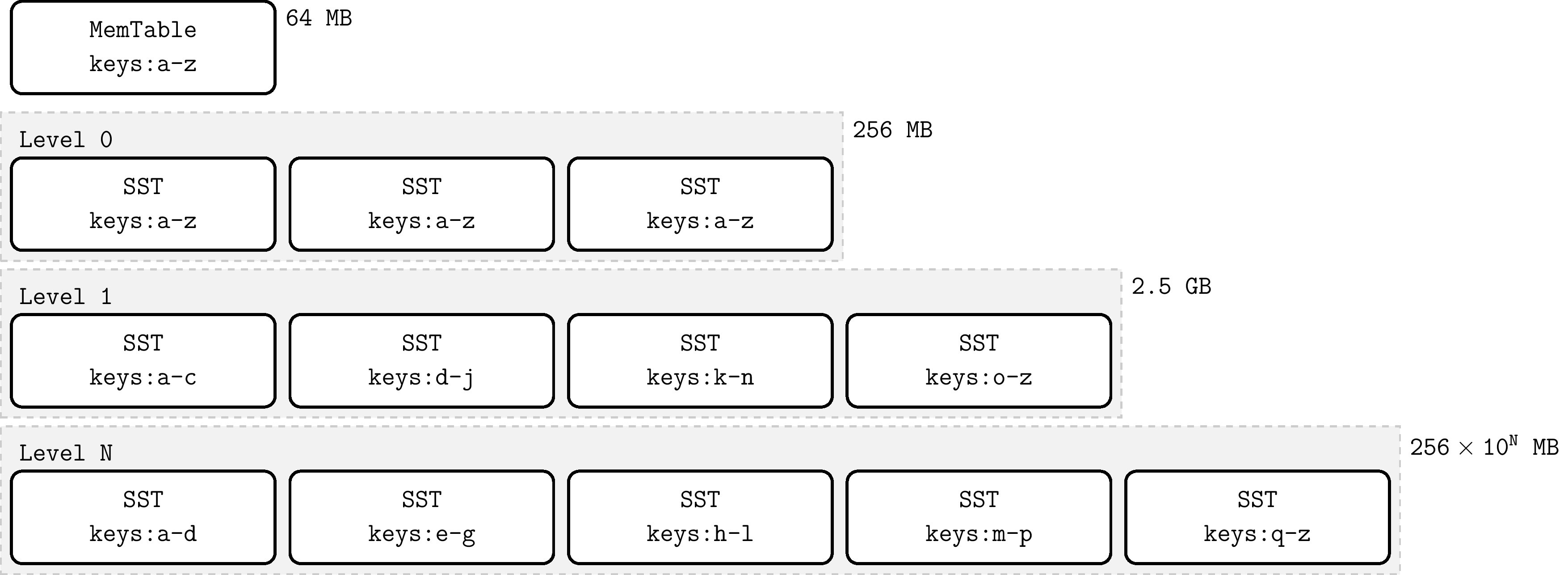
Compaction merges SST files of a certain level with SST files of the next level, and in this process discards deleted and overwritten invalid keys. Compaction runs in a dedicated background thread pool, ensuring that RocksDB can normally handle user read/write requests while doing Compaction.
When the number of SST files on L0 level reaches a certain threshold (default 4), Compaction is triggered. For level L1 and below, when the total size of SST files at the entire level exceeds the configured target size, Compaction is triggered. When this happens, it may trigger Compaction from level L1 to L2. Thus, Compaction from L0 to L1 may trigger cascading Compaction all the way to the lowest level. After Compaction completes, RocksDB updates metadata and deletes files that have been compacted from disk.
3.2.2 Data Query
In this ordered data structure of LSM-Tree, querying a certain key only needs to traverse down from top to bottom, visiting corresponding tree nodes level by level. The lookup starts from MemTable, dives to L0, and continues to lower levels until that key is found or all possible SST files are checked.
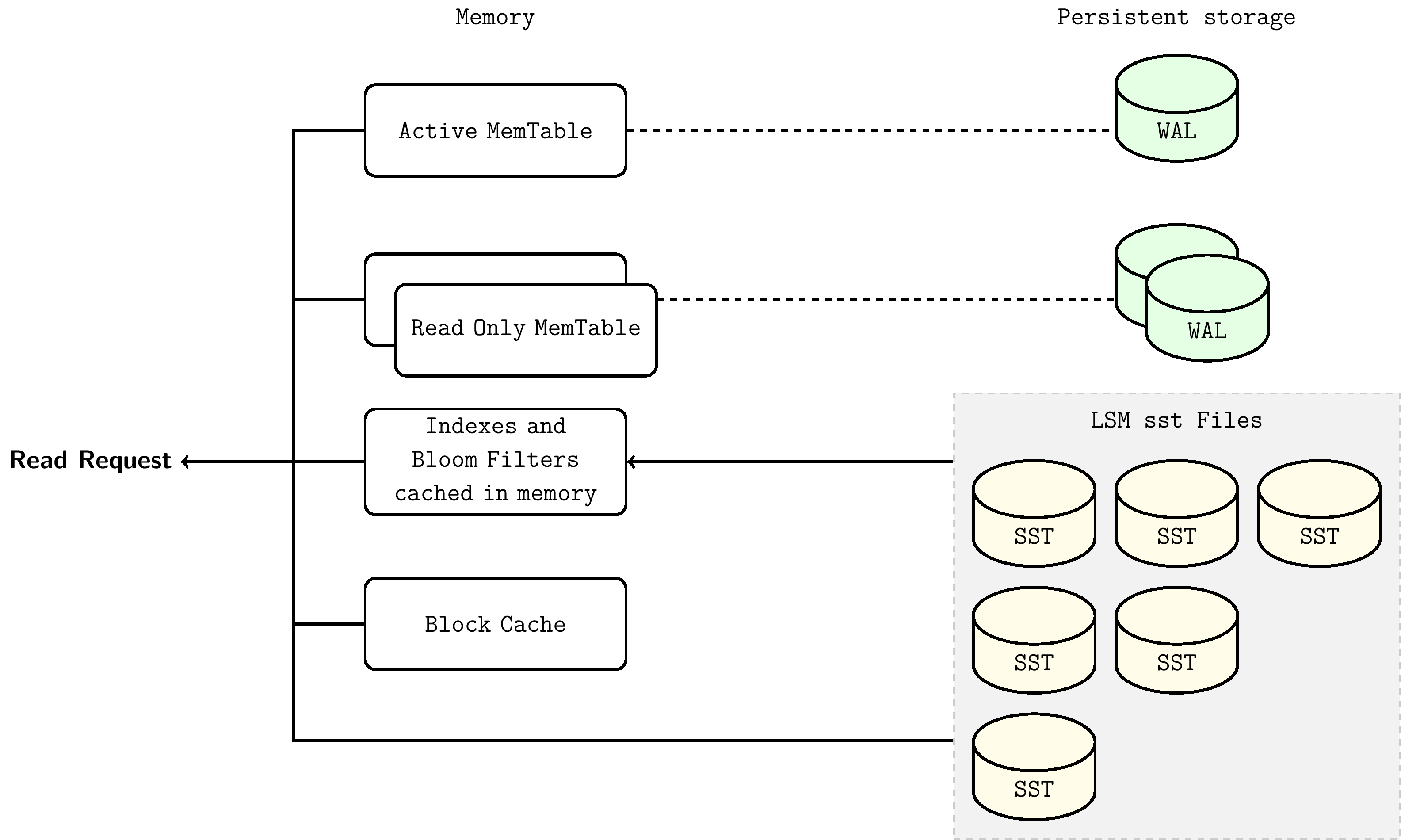
Lookup steps are as follows:
- Search MemTable
- Search immutable MemTables
- Search all SST files in the most recently flushed L0 level
- For level L1 and below, first find the single SST file that may contain that key, then search within the file
The steps for searching SST files are as follows:
- Use bloom filter to determine whether this key is in this file (optional)
- Find the index block to locate the position of the block that may contain this key
- Read the data block and try to find this key in it